OpenWrt
Install AmneziaWG on an OpenWrt router — route your whole home network through Lunaire, no per-device clients needed.
Why not opkg install
AmneziaWG is not in the standard OpenWrt repositories — opkg install amneziawg-tools will not work. Prebuilt packages for every platform come from the community awg-openwrt repository (Slava-Shchipunov); installation is covered below.Find your router's platform
Connect to the router via SSH (default address is 192.168.1.1) and check DISTRIB_TARGET — that's the platform (target/subtarget) packages are built for. You'll need it if you have to install manually.
ssh root@192.168.1.1
cat /etc/openwrt_release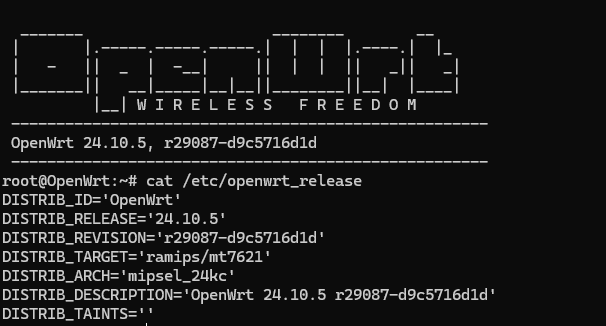
Install AmneziaWG with one command
The script detects your platform and OpenWrt version automatically, then downloads and installs the three required packages: kmod-amneziawg, amneziawg-tools and luci-proto-amneziawg. Nothing to pick manually — at the end it offers to create the interface right away.
sh <(wget -O - https://raw.githubusercontent.com/Slava-Shchipunov/awg-openwrt/refs/heads/master/amneziawg-install.sh)
Script won't download?
Some ISPs block raw.githubusercontent.com. In that case use the manual IPK installation — see "If the script didn't work" below.Get your config from the bot
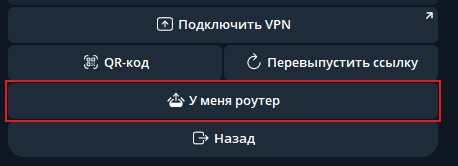
Open @LunaireVPNBot → Connect VPN → "I have a router". The bot returns a ready-made AmneziaWG config with all obfuscation parameters — you'll paste it whole below.
![AmneziaWG config from the bot: [Interface] and [Peer] sections with Jc/Jmin/Jmax, S1–S2, H1–H4 obfuscation parameters.](/_next/image?url=%2Fdocs%2Fopenwrt%2F05-openwrt-bot-config.png&w=3840&q=75)
Now pick one of two paths
There are two ways to set up the interface. The simpler, more reliable one is right inside the install script (Path A) — it brings up the interface, firewall and routing for you. If you prefer a web UI, use Path B via LuCI. Either one is enough.
Path A — via the install script
Recommended · fully automatic
After installing the packages, the script from step 2 asks whether to configure the interface. Answer yes and paste the values from the bot config one by one (private key, address, server public key, preshared key, endpoint and the obfuscation parameters Jc/Jmin/Jmax, S1–S2, H1–H4). Nothing else to do.
Firewall and routing — already done
The script creates the awg1 interface, a dedicated firewall zone with masquerade, LAN forwarding (lan → awg1) and restarts the network itself. No separate firewall setup needed — jump straight to verifying the connection below.Path B — manually via LuCI
If you prefer a web UI
Create the interface and import the config
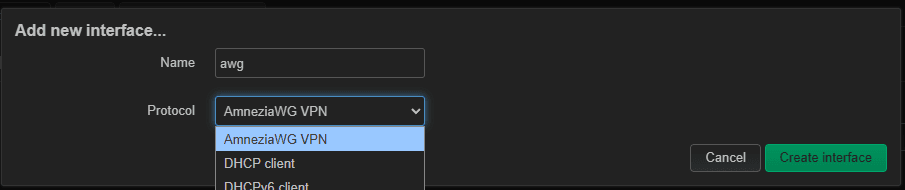
Open the router's web UI: Network → Interfaces → Add new interface. Pick a name (e.g. awg) and select the AmneziaWG VPN protocol.
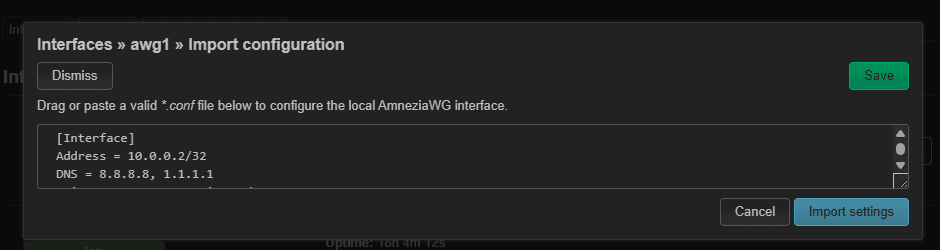
In the interface settings click Load configuration, paste the entire config from the bot and hit Import settings — every field, including the obfuscation parameters, fills in automatically.
Assign the firewall zone
Open the Firewall Settings tab in the interface settings and assign it the wan zone (or create a dedicated zone with masquerade and forwarding from lan). Save & Apply and restart the interface.
This step is required for Path B
The LuCI import fills in the interface only — it doesn't create a firewall zone. Without one the interface comes up but no traffic flows through the tunnel. (In Path A the script creates the zone, which is why that path skips this step.)Verify the connection
On Network → Interfaces the interface should come up: status UP, RX/TX counters growing. For a definitive check, run a ping over SSH and look up your public IP — it should match the Lunaire server address.

ping -c 3 8.8.8.8
wget -qO- https://ipinfo.io/ip
If the script didn't work — manual IPK install
You can get the same result by hand: download the three packages for your platform and install them on the router.
- 1Open the releases page at github.com/Slava-Shchipunov/awg-openwrt/releases and pick the release matching your OpenWrt version (e.g. v24.10.5).
- 2Find (Ctrl+F) the three files with your platform in the name — e.g. kmod-amneziawg_…_ramips_mt7621.ipk — and download them. You found your platform in step 1.
- 3Upload the packages to the router: via LuCI (System → Software → Upload Package, one at a time) or copy them over scp and install with opkg — kmod first, then tools and luci-proto.
opkg install ./kmod-amneziawg_*.ipk
opkg install ./amneziawg-tools_*.ipk
opkg install ./luci-proto-amneziawg_*.ipk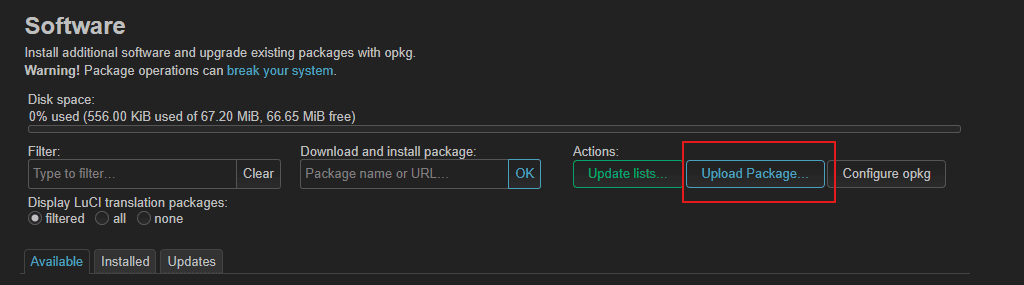
No prebuilt packages for your platform? That's solvable: fork the repository and run GitHub Actions with your OpenWrt version and target/subtarget (a build takes 10–15 minutes), or open an Issue asking to add the platform. Alternative builds exist too: ValdikSS/awg-openwrt, amnezia-vpn/amneziawg-openwrt and other forks of the same source.
After a manual package install there's no setup wizard — configure the interface via Path B (LuCI), and don't forget the firewall zone.
Troubleshooting
Install fails: kernel mismatch / incompatible architecture
The package doesn't match your platform or firmware version. Compare DISTRIB_TARGET and DISTRIB_RELEASE from step 1 against the IPK file name and the GitHub release — they must match exactly.
Interface won't come up: Unable to modify interface / Invalid argument
Usually outdated packages: kmod-amneziawg and luci-proto-amneziawg must be fresh and from the same release. Check the installed versions (command below) and reinstall with the current install script if needed.
Interface is UP but no internet
Check in order: firewall (the interface must be in the wan zone — step 5), MTU (try lowering to 1280 in the interface settings), DNS (nslookup google.com from the router) and the default route via the awg interface (ip route).
RX: 0 B — packets go out, nothing comes back
The handshake isn't completing. Most often the config wasn't pasted whole — check that every obfuscation parameter (Jc/Jmin/Jmax, S1–S2, H1–H4) and the full server PublicKey are present: the server won't respond without them. Copy the config from the bot again and re-paste it without trimming anything. If all fields are definitely there, your ISP may be blocking the Endpoint: message @LunaireCare and we'll pick a different port/address.
cat /etc/openwrt_release | grep BOARD
opkg list-installed | grep amneziawg
logread | grep -i amnezia | tail -n 30
Still stuck — talk to us
Telegram: @LunaireCare. Send your router model and OpenWrt version, the output of the three commands below and the step you're stuck on — we'll dig through the logs and reply within a day.Requirements
- An OpenWrt version with a matching awg-openwrt release (current 21.02–24.10 branches are covered)
- At least 16 MB flash / 128 MB RAM
- SSH access to the router and access to LuCI